 Pierre Roy
How I Built This Portfolio in Kotlin with Kobweb
The website you are reading this on is written entirely in Kotlin. No HTML files, no CSS files, no JavaScript I wrote by hand. Every page, every style rule, and the whole build pipeline is Kotlin compiled to JavaScript through Kobweb and Compose HTML.
This article is the story of how it got here, why I picked this stack, and the parts of the build that I think are actually interesting.
How it started: a school assignment
This portfolio was not a free choice at first. It was a mandatory summer project for my school, Ynov Aix, at the end of my first year. Everyone had to build a personal portfolio over the break. Most people reached for the usual HTML/CSS/JS or a template. I decided to make mine a bit harder on purpose and write the whole thing in Kotlin, because I wanted to actually learn something instead of filling in a template.
My internship tutor at the time helped me with the design side, which is not my strong suit. The overall layout, the color choices, and the general feel of those early versions came out of that back-and-forth. I handled the code, he pushed me on how it looked.
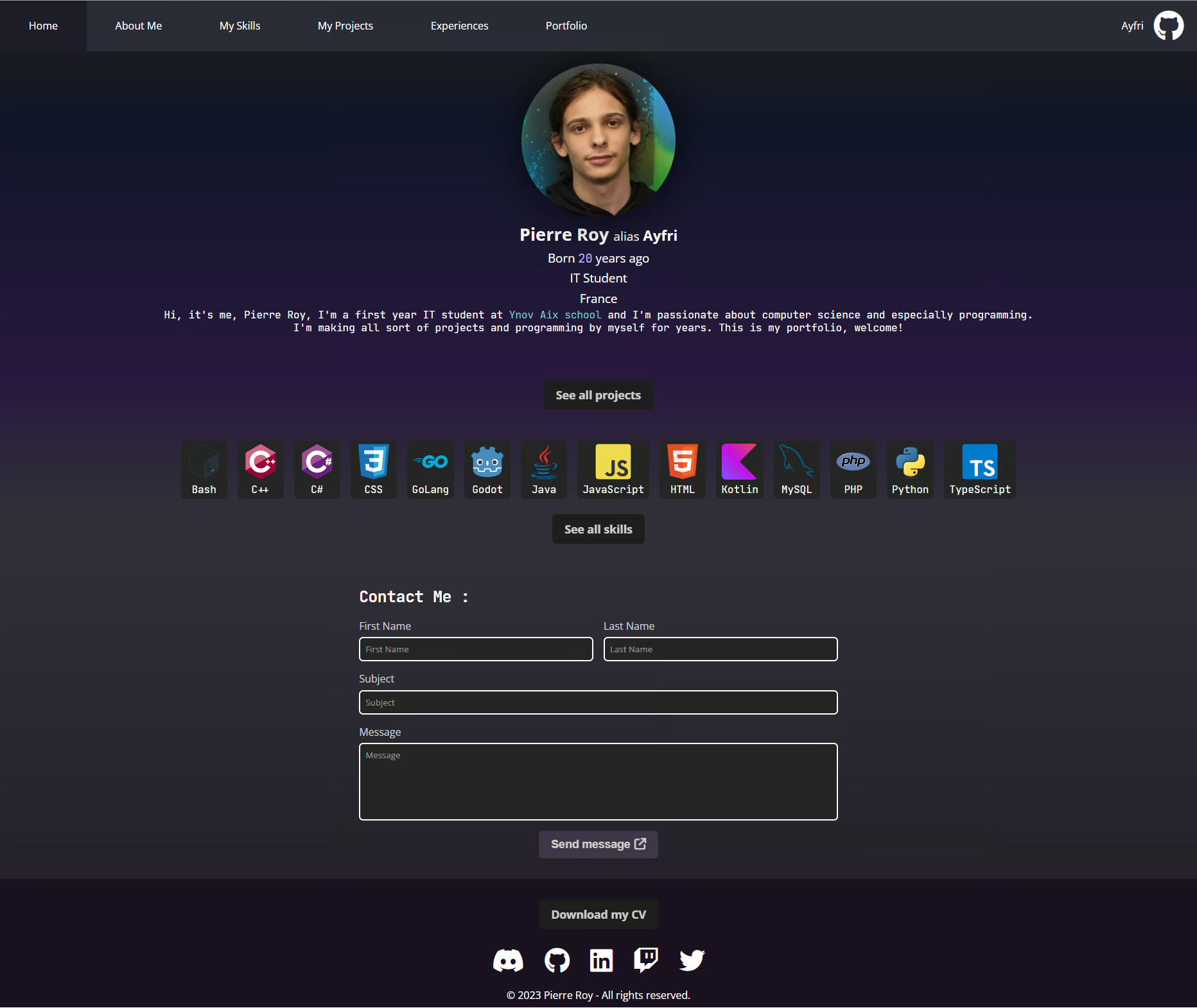
Here is the very first shipped version, from June 2023, still a single scrollable page with a contact form at the bottom:
Why Kotlin for a website
I like Kotlin. That is honestly most of the reason. But there is a real argument too: I get one language with a strong type system for the UI, the styling, and the build script. If I rename a component, the compiler tells me every place I broke. If I typo a CSS color constant, it does not build. That safety net does not exist when you are gluing together HTML, CSS, and JS by hand.
The tradeoff is that the ecosystem is tiny compared to the JS world, and you feel the bleeding edge regularly. I was fine with that. What started as a school constraint turned into a long-running playground I keep coming back to.
A short history of progression
The project started in June 2022. The first version was raw Compose for Web with the routing-compose library bolted on for navigation. It worked, but I was hand-rolling a lot of things Kobweb gives you for free: routing, the head block, static export, a dev server with live reload.
Some milestones from the git log:
- June 2022 - Initial commit. Plain Compose HTML plus
routing-compose, Kotlin 1.6.21. - 2022-2023 - Slow iteration. Meta tags moved into the HTML directly so they actually work for SEO, localStorage safe-guards, dependency bumps.
- November 2023 - The big one. I installed Kobweb, moved everything into the
io.github.ayfripackage, switched to Gradle version catalogs, and ripped outrouting-composein favor of Kobweb's file-based routing and layouts. - 2024-2026 - Steady modernization. Kotlin 1.9 to 2.3, Compose 1.5 to 1.10, Kobweb 0.15 to 0.24, plus a 404 page, a generated sitemap, JSON-LD schema, and proper meta descriptions per page and article.
- September 2026 - A full redesign around the colors of my logo, page transitions, scroll-driven animations instead of scroll listeners, and a faster build. More on that below.
The migration to Kobweb in late 2023 is the moment this went from a hobby experiment to something maintainable. Dropping routing-compose for @Page-annotated files meant a new page is just a new Kotlin file in the right folder.
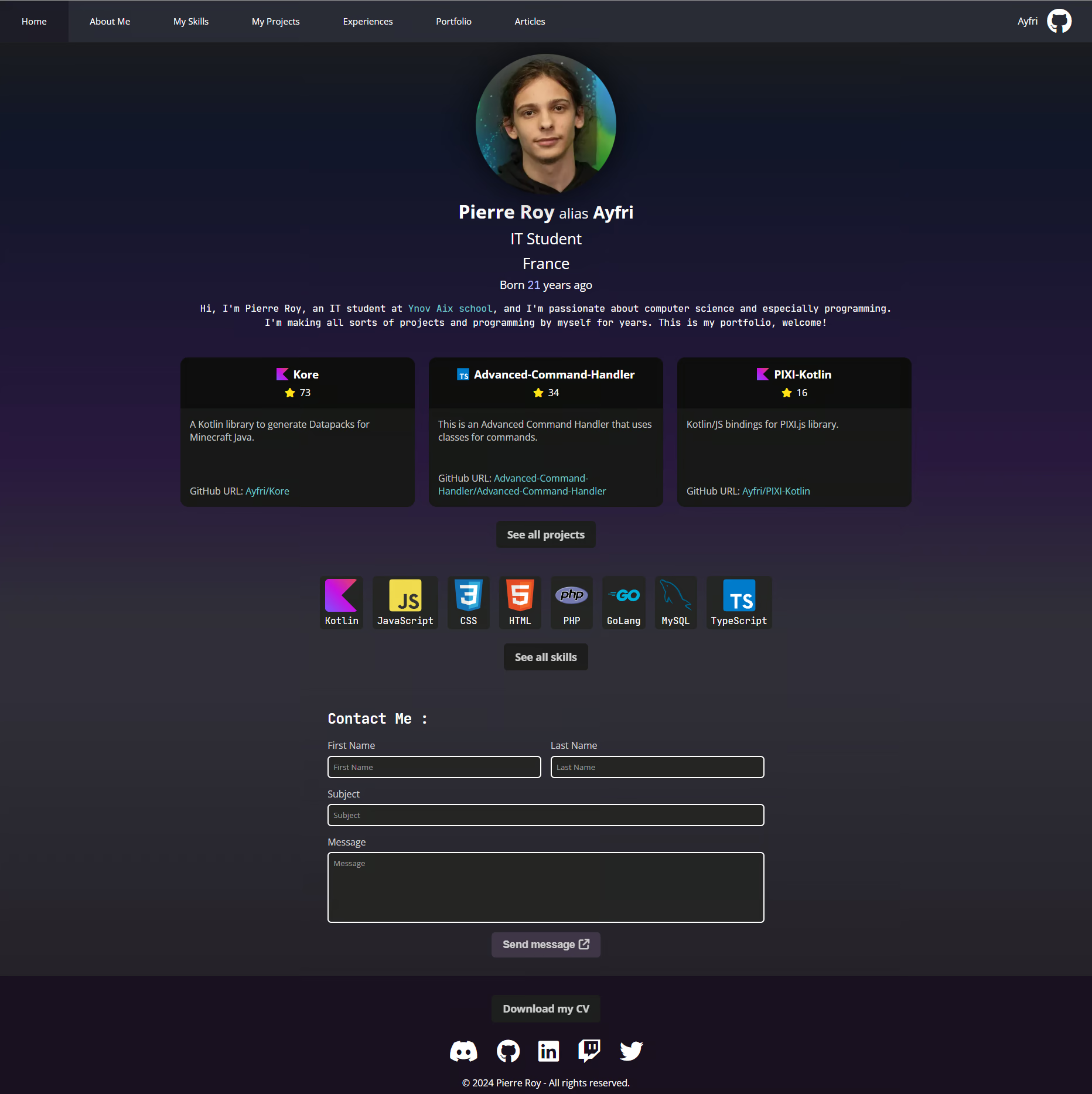
By August 2024 the home page had grown real project cards pulled from GitHub, an Articles tab, and a cleaner layout:
What Kobweb actually gives you
Kobweb is a framework built on top of Compose HTML by Varabyte. The pieces I lean on most:
- File-based routing. A
@Pageannotation on a composable inpages/becomes a route.pages/AboutMe.ktmaps to/about-me. - Static export.
./gradlew kobwebExportrenders every route to static HTML, so the site loads fast and is fully crawlable, then hydrates into a single-page app. - A typed
headblock. I configure meta tags, preloads, and fonts in the Gradle build with a Kotlin DSL instead of an HTML template. - Live reload dev server.
./gradlew kobwebStart -tand the page reloads on save.
Here is what a page entry point looks like. This is the real home page:
The PageLayout wraps the content with the header, footer, and shared page chrome. Articles use a different root, ArticleLayout, set right in their Markdown front matter.
CSS in Kotlin, no stylesheet files
There are zero .css files I wrote for layout. Styling is done with Compose HTML's StyleSheet DSL, which is type-safe and colocated with the component. A real example, the filter chips of the projects and articles pages:
hover(self) compiles to a :hover selector and self + className("active") to .active on the same element. Units like 1.px and .85.cssRem are real Kotlin extension properties, so a typo is a compile error, not a silently broken rule. tint is a one-line helper emitting a color-mix(), so translucent variants always derive from the palette instead of new hex literals. I get autocomplete on CSS properties, which sounds small but adds up over hundreds of rules.
The build script does the heavy lifting
The most interesting code in this repo is not a page, it is build.gradle.kts. A few things happen at build time so the browser never has to.
Markdown to Kotlin at compile time
Articles live as .md files with YAML front matter in resources/markdown/articles/. The KobwebX Markdown plugin converts each one into a Compose composable at build time. On top of that, I hook the build to generate a single articlesEntries list holding every article's metadata, sorted by date, so the article index page is fully static:
I also override the Markdown handlers so images get loading="lazy" and decoding="async" automatically, and code blocks route through my own CodeBlock composable for Prism.js highlighting. One gotcha with generating Kotlin from Markdown: dollar signs. Kotlin treats $ as string interpolation, so any $ in an article has to be escaped to ${"$"} in the generated source, which the build does with a regex pass.
Project data fetched at build time
My GitHub projects are not fetched in the browser. A downloadData Gradle task pulls a JSON snapshot of my repos and generates Kotlin source from it. The data is available during static export, so crawlers receive the final project content without hitting the GitHub API on every visit.
A sitemap that reads my own source
The generateSitemap task walks the pages/ directory looking for @Page annotations to discover static routes, then reads each article's routeOverride and date-modified from front matter for accurate lastmod values. The sitemap is generated from the source of truth, so it can never drift out of sync with the actual routes.
The September 2026 redesign
By late 2026 the site looked like a patchwork of every year it went through, so I rebuilt the whole theme in one go.
One palette, taken from the logo
Every color now comes from my logo, a neon tube fading cyan -> violet -> orchid, on a violet-black starfield. All the colors and shared primitives (cards, tags, chips, inputs, buttons, page titles) live in a single AppStyle sheet, and pages only compose them. The full logo gradient is reserved for a handful of highlights, like the hovered featured project cards, so it still means something when it shows up.
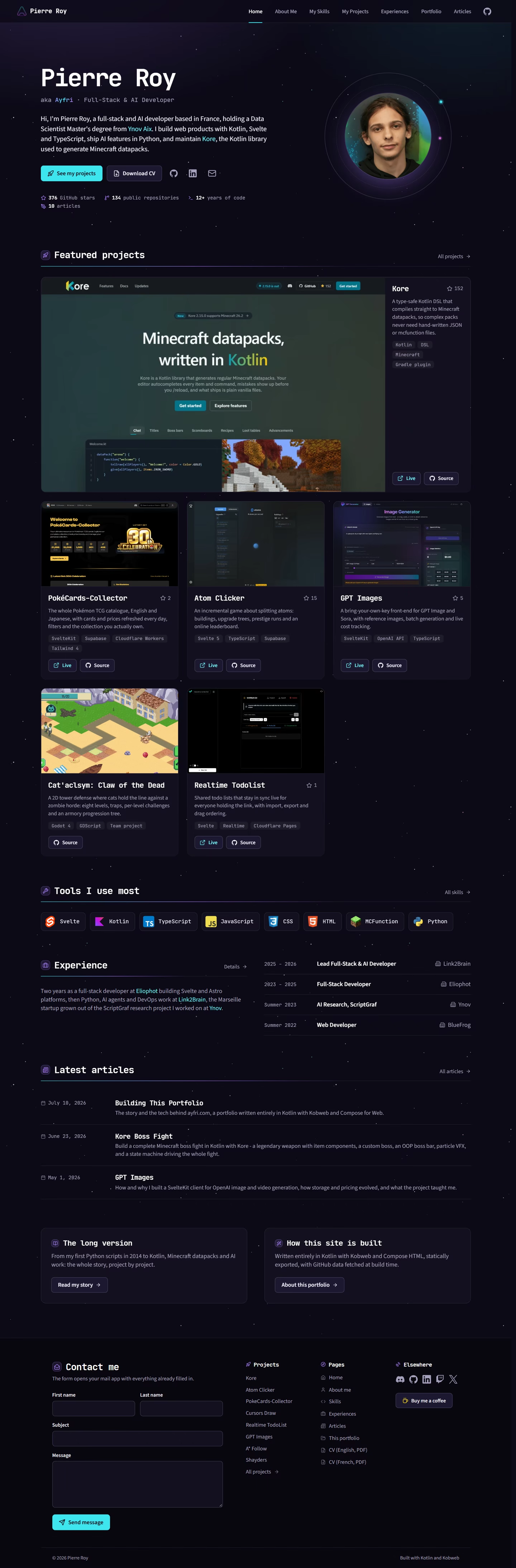
The home page got the biggest rework: a left-aligned hero with an animated orbit around my photo, a hand-picked selection of flagship projects with screenshots of the live sites instead of a ranking by GitHub stars, and a compact experience timeline. The experiences page presents each role as a card on a timeline, with its logo, period, highlights and stack.
Page transitions with the View Transitions API
Navigating between pages runs a view transition: the header stays in place, the old page lifts away, the new one rises in, and the page title and the active tab morph from one page to the next. It only takes a view-transition-name on the elements that should morph, and the browser animates the rest.
Scroll-driven animations instead of scroll listeners
Every "on scroll" effect of the site is now pure CSS with scroll-driven animations, so there is no scroll listener left doing layout reads on the main thread. The back-to-top button of this article fades in over the first 300px of scroll:
The reading progress bar at the top works the same way, and cards fade in as they enter the viewport with a view() timeline. The About me page highlights the section you are reading with an IntersectionObserver, and long lists skip rendering off-screen items with content-visibility: auto.
Native HTML over JavaScript
The mobile menu is a native popover, which brings Escape and click-outside closing for free. The screenshots of the portfolio page open in a modal <dialog> through invoker commands: a button with commandfor and command="show-modal", and closedby="any" on the dialog, without a single line of JavaScript.
A faster build and a lighter first paint
- The production bundle is minified with SWC instead of Terser, and the source map the static export discards is no longer built.
- The GitHub snapshot keys are converted to camelCase at build time, so the browser parses the JSON straight into typed external interfaces instead of walking every object through a reviver on first paint.
- The Kotlin/JS toolchain uses npm instead of Yarn, and Gradle runs with the parallel configuration cache.
- My photo is an AVIF served through
<picture>, with a PNG fallback for the browsers that can't decode it. - Icons are inline Lucide SVGs from Kobweb's
silk-icons-lucideartifact, one typed composable per icon, so no icon font or third-party kit script is downloaded, and only the icons the site uses end up in the bundle.
The current stack
As of October 2026, the versions are:
- Kotlin 2.4.20 targeting ES2015 with ES modules and ES classes
- Compose HTML 1.12 for the UI, Compose runtime 1.12
- Kobweb 0.25.1 for routing, export, and the head DSL
- Kotlin wrappers for typed browser APIs, plus
markedvia npm for the project READMEs - Gradle 9.8 with the configuration cache, and SWC to minify the bundle
The Kotlin/JS compiler flags are tuned for a smaller, faster bundle: -Xir-property-lazy-initialization, no polyfill generation, and es2015 output so I ship modern JS instead of transpiled-down cruft.
Here is the home page today, October 2026, after the redesign:
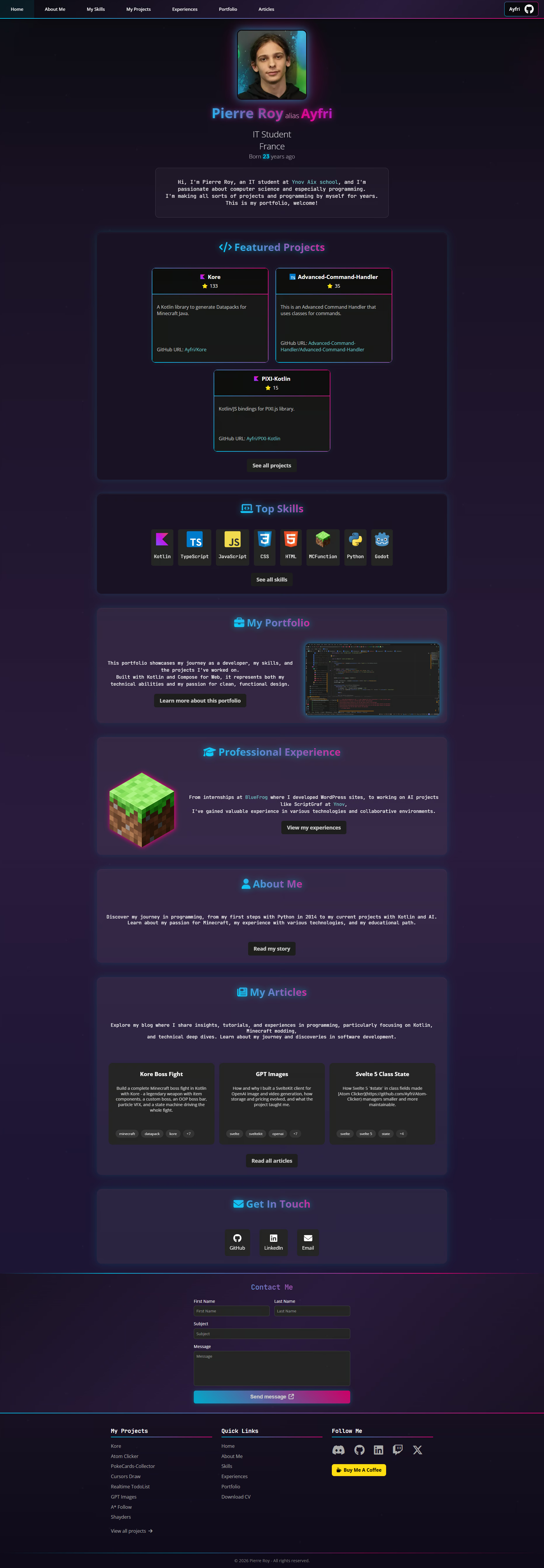
And for comparison, the July 2026 version right before it:
Was it worth it
For a production app with a team, I would probably reach for SvelteKit. For my own portfolio, Kotlin all the way down has been genuinely enjoyable. I refactor without fear, styling and logic live in the same typed world, and the build script grew into a little static-site generator tailored exactly to what I need.
If you want to poke around, the whole thing is open source on GitHub. Clone it, run ./gradlew kobwebStart -t, and you have the same live-reload setup I develop with every day.
Keep reading
-
Build a Boss Fight Datapack with Kore
Build a complete Minecraft boss fight in Kotlin with Kore - a legendary weapon with item components, a custom boss, an OOP boss bar, particle VFX, and a state machine driving the whole fight.
minecraftdatapackkorekotlintutorial+8 -
Detect an entity in a zone with Kore
Detect when a player enters a specific area in Minecraft using a Kore Kotlin library. Learn how to create a datapack that triggers an event when a player enters a defined zone.
minecraftdatapackkorekotlintutorial+5 -
Simple Timer Datapack with Kore
Create a timer datapack that displays a message every 20 seconds using the Kore library for Minecraft.
minecraftdatapackkorekotlintutorial+4